

Kreator otworu kieszeniowego
Pocket Hole Creator
Ten skrypt służy do tworzenia otworu kieszeniowego w modelu.
- Otwórz model części, w którym chcesz utworzyć otwór kieszeniowy.
- Kliknij kartę „Skrypt” (Script) na wstążce, a następnie kliknij „Uruchom” (Launch).
- Wklej poniższy skrypt do okna „Nowy skrypt” (New Script Window), kliknij „Zapisz jako” (Save As) na karcie „Skrypt” na wstążce i zapisz plik w folderze.
- Umieść plik PocketHoleCreatorIcon.png dostępny pod poniższym łączem w tym samym folderze co w kroku (3).
https://help.alibre.com/resources/Storage/Downloads/PocketHoleCreatorIcon.png

- Kliknij „Uruchom” (Run) w grupie „Skrypt” (Script) na wstążce. Zostanie wyświetlone okno dialogowe „Kreator otworu kieszeniowego”.
- Kliknij „Krawędź” (Edge) modelu, aby wypełnić pole „Krawędź” w oknie dialogowym. Kliknij pole „Lico” (Face) w oknie dialogowym, a następnie kliknij lico modelu, aby wypełnić to pole.
- Wprowadź pozostałe żądane parametry w oknie dialogowym i kliknij „Utwórz otwór kieszeniowy” (Create Pocket Hole), aby zakończyć operację.
„Kopiuj” (Copy) kod Python
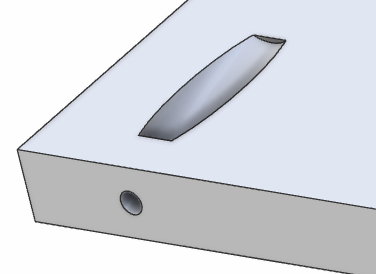
# Pocket Hole Creator# (c) Alibre, LLC 2019, All Rights Reserved# Version 1.00
from __future__ import divisionfrom math import *
# compares two points [X1, Y1, Z1] and [X2, Y2, Z2]# returns true if they are the samedef PointsAreEqual(P1, P2): if (round(P1[0], 6) == round(P2[0], 6) and round(P1[1], 6) == round(P2[1], 6) and round(P1[2], 6) == round(P2[2], 6)): return True else: return False
# gets part faces that use an edge# returns a list of facesdef GetFacesFromEdge(Prt, Ege): Faces = [] PartEdge = [[Ege.Vertices[0].X, Ege.Vertices[0].Y, Ege.Vertices[0].Z], [Ege.Vertices[1].X, Ege.Vertices[1].Y, Ege.Vertices[1].Z]] for Fce in Prt.Faces: for Edg in Fce.GetEdges(): EdgeVertices = Edg.GetVertices() V1 = [EdgeVertices[0].X, EdgeVertices[0].Y, EdgeVertices[0].Z] V2 = [EdgeVertices[1].X, EdgeVertices[1].Y, EdgeVertices[1].Z] if ((PointsAreEqual(V1, PartEdge[0]) and PointsAreEqual(V2, PartEdge[1])) or (PointsAreEqual(V2, PartEdge[0]) and PointsAreEqual(V1, PartEdge[1]))): Faces.append(Fce) return Faces
# given a part, face and edge of the face this returns the other face# that shares the same edgedef GetOtherFace(Prt, Edg, TopFace): Fces = GetFacesFromEdge(Prt, Edg) for EgeFace in Fces: if EgeFace.Name != TopFace.Name: return EgeFace return None
# creates a pocket holedef CreatePocketHole(Values): # TargetEdge = edge that the pocket hole is on # Fce = face where the pocket is inserted # DistanceFromEdge = distance from the edge of the face for the packet # Depth = distance from pocket to drill hole # Diameter = diameter of packet # DrillDiameter = diameter of drill hole # Angle = angle of pocket TargetEdge = Values[1] Fce = Values[2] DistanceFromEdge = Values[3] Depth = Values[4] Diameter = Values[5] DrillDiameter = Values[6] Angle = Values[7]
Prt = Fce.GetPart()
# get face that has exit hole ExitFace = GetOtherFace(Prt, TargetEdge, Fce)
# get thickness of part (height of face with exit hole) ExitFaceEdges = ExitFace.GetEdges()
Thickness = 0 for ExEdg in ExitFaceEdges: if ExEdg.Length > 0: if ExEdg.Length != TargetEdge.Length: Thickness = ExEdg.Length if Thickness == 0: print "Unable to get thickness of part" sys.exit()
# get location of center of exit hole ExitHoleCenterX = TargetEdge.Length - DistanceFromEdge ExitHoleCenterY = Thickness / 2.0
# get location of exit hole center in 3D coordinates ExitSk = Prt.AddSketch('Exit Sk', ExitFace) ExitSk.StartFaceMapping(TargetEdge.Vertices[0], TargetEdge.Vertices[1]) ExitPt = ExitSk.AddPoint(ExitHoleCenterX, ExitHoleCenterY, False) ExitSk.StopFaceMapping() ExitPtGlobal = ExitSk.PointtoGlobal(ExitSk.Figures[0].X, ExitSk.Figures[0].Y)
Prt.RemoveSketch(ExitSk)
# create exit point ExitPoint = Prt.AddPoint('Exit', ExitPtGlobal[0], ExitPtGlobal[1], ExitPtGlobal[2])
# get location of entry hole in 2D EntryHoleCenterX = DistanceFromEdge EntryHoleCenterY = (Thickness / 2.0) / tan(radians(Angle))
# get location of entry hole center in 3D coordinates EntrySk = Prt.AddSketch('Entry Sk', Fce) EntrySk.StartFaceMapping(TargetEdge.Vertices[0], TargetEdge.Vertices[1]) EntryPt = EntrySk.AddPoint(EntryHoleCenterX, EntryHoleCenterY, False) EntrySk.StopFaceMapping() EntryPtGlobal = EntrySk.PointtoGlobal(EntrySk.Figures[0].X, EntrySk.Figures[0].Y) Prt.RemoveSketch(EntrySk)
# create entry point EntryPoint = Prt.AddPoint('Entry', EntryPtGlobal[0], EntryPtGlobal[1], EntryPtGlobal[2])
# create axis from entry to exit point PocketAxis = Prt.AddAxis('Pocket Axis', EntryPoint.GetCoordinates(), ExitPoint.GetCoordinates())
# create plane perpendicular to axis on the start point nx = ExitPtGlobal[0] - EntryPtGlobal[0] ny = ExitPtGlobal[1] - EntryPtGlobal[1] nz = ExitPtGlobal[2] - EntryPtGlobal[2] EntryPlane = Prt.AddPlane('Entry Plane', [nx, ny, nz], EntryPoint.GetCoordinates())
# get drill distances EntrytoExitDistance = (Thickness / 2.0) / sin(radians(Angle)) Drill1Distance = EntrytoExitDistance - Depth
# first drill Drill1Sk = Prt.AddSketch('Drill 1', EntryPlane) DrillCenter = Drill1Sk.GlobaltoPoint(EntryPtGlobal[0], EntryPtGlobal[1], EntryPtGlobal[2]) Drill1Sk.AddCircle(DrillCenter[0], DrillCenter[1], Diameter, False) Prt.AddExtrudeCut('Drill 1', Drill1Sk, Drill1Distance * 2, False, Part.EndCondition.MidPlane, None, 0, Part.DirectionType.Normal, None, 0, 0)
# second drill Drill2Sk = Prt.AddSketch('Drill 2', EntryPlane) DrillCenter = Drill2Sk.GlobaltoPoint(EntryPtGlobal[0], EntryPtGlobal[1], EntryPtGlobal[2]) Drill2Sk.AddCircle(DrillCenter[0], DrillCenter[1], DrillDiameter, False) Prt.AddExtrudeCut('Drill 2', Drill2Sk, 0, False, Part.EndCondition.ThroughAll, None, 0, Part.DirectionType.Normal, None, 0, 0)
# clean up EntryPoint.Hide() ExitPoint.Hide() PocketAxis.Hide() EntryPlane.Hide()
###########################################################################################
# check minimum requirementsif AlibreScriptVersion < 1110: sys.exit('Please upgrade your copy of Alibre Design to use this script')
ScriptName = 'Pocket Hole Creator'
Win = Windows()
# define options to show in dialog windowOptions = []Options.append([None, WindowsInputTypes.Image, 'PocketHoleCreatorIcon.png', 200])Options.append(['Edge', WindowsInputTypes.Edge, None])Options.append(['Face', WindowsInputTypes.Face, None])Options.append(['Distance From Edge', WindowsInputTypes.Real, 20.0])Options.append(['Depth', WindowsInputTypes.Real, 10.0])Options.append(['Diameter', WindowsInputTypes.Real, 10.0])Options.append(['Drill Diameter', WindowsInputTypes.Real, 4.0])Options.append(['Angle', WindowsInputTypes.Real, 15.0])
# show utility windowWin.UtilityDialog(ScriptName, 'Create Pocket Hole', CreatePocketHole, None, Options, 200)Oryginał: Pocket Hole Creator