Okno niestandardowych wartości i ustawień
Custom Values and Settings Window
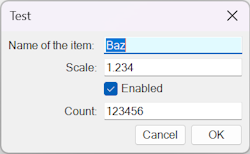
Pokazuje, jak utworzyć niestandardowe okno dialogowe, w którym użytkownik wprowadza wartości i ustawienia. Obsługiwane typy danych wejściowych: liczba całkowita, liczba rzeczywista (float), pole wyboru i tekst.
# create windows objectWin = Windows()
# construct list of items for the windowOptions = []# ask user for textOptions.append(['Name of the item', WindowsInputTypes.String, 'Baz'])# ask user for a floating point (real) valueOptions.append(['Scale', WindowsInputTypes.Real, 1.234])# checkboxOptions.append(['Enabled', WindowsInputTypes.Boolean, True])# ask user for an integerOptions.append(['Count', WindowsInputTypes.Integer, 123456])
# show window and output results# if user closes window or clicks on Cancel button then Values will be set to 'None'Values = Win.OptionsDialog('Test', Options)print Values
Oryginał: Custom Values and Settings Window