

Tworzenie płaszczyzn, osi i punktów odniesienia
Create Reference Planes, Axes, and Points
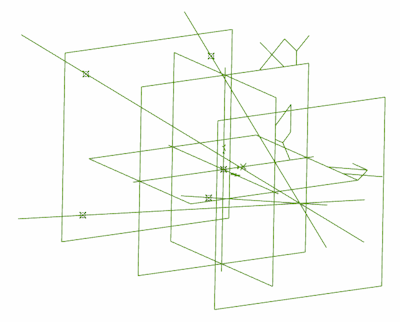
Krótki przykład pokazujący, jak tworzyć płaszczyzny, osie i punkty odniesienia.
# demonstrates creating reference geometry
# create a new part and get the xy planeMyPart = Part('My Part')XYPlane = MyPart.GetPlane('XY-Plane')
# create planes 100mm above and below the xy planeTopPlane = MyPart.AddPlane('Top Plane', XYPlane, 100.0)BottomPlane = MyPart.AddPlane('Bottom Plane', XYPlane, -100.0)
# add reference points to bottom planeRef1 = MyPart.AddPoint('Ref 1', 50.0, 50.0, -100.0)Ref2 = MyPart.AddPoint('Ref 2', 50.0, -50.0, -100.0)Ref3 = MyPart.AddPoint('Ref 3', -50.0, -50.0, -100.0)Ref4 = MyPart.AddPoint('Ref 4', -50.0, 50.0, -100.0)
# add reference axes from points on bottom plane to center of top planeAxis1 = MyPart.AddAxis('Axis 1', [50.0, 50.0, -100.0], [0.0, 0.0, 100.0])Axis2 = MyPart.AddAxis('Axis 2', [50.0, -50.0, -100.0], [0.0, 0.0, 100.0])Axis3 = MyPart.AddAxis('Axis 3', [-50.0, -50.0, -100.0], [0.0, 0.0, 100.0])Axis4 = MyPart.AddAxis('Axis 4', [-50.0, 50.0, -100.0], [0.0, 0.0, 100.0])